

Sync Schedule
The sync schedule controls how often Conduit for Xero synchronises data between Salesforce® and Xero. The schedule is set once and applies to all connected tenants, not per tenant.
Changing the Sync Frequency
Section titled “Changing the Sync Frequency”The current schedule is shown under Sync Frequency in the Conduit for Xero page header, beneath the page title. It appears on every Conduit for Xero page, so you can change it from General Settings, Account Matching, Product Matching or Mappings. If no schedule has been set yet, it shows Not Configured.
Click the arrow next to the current frequency and select how often the sync runs. A tick marks the current selection.
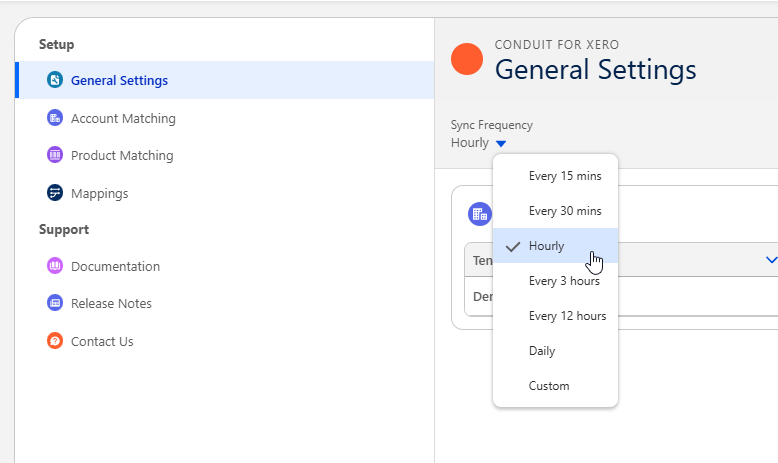
The available frequencies are:
- Every 15 mins
- Every 30 mins
- Hourly (recommended for most organisations)
- Every 3 hours
- Every 12 hours
- Daily
- Custom
Selecting any frequency other than Custom saves it straight away. The sync runs around the clock (24/7) at that frequency.
Restricting the Sync to Business Hours
Section titled “Restricting the Sync to Business Hours”To limit when the sync runs, select Custom from the Sync Frequency menu. The Configure Sync Frequency dialog opens.
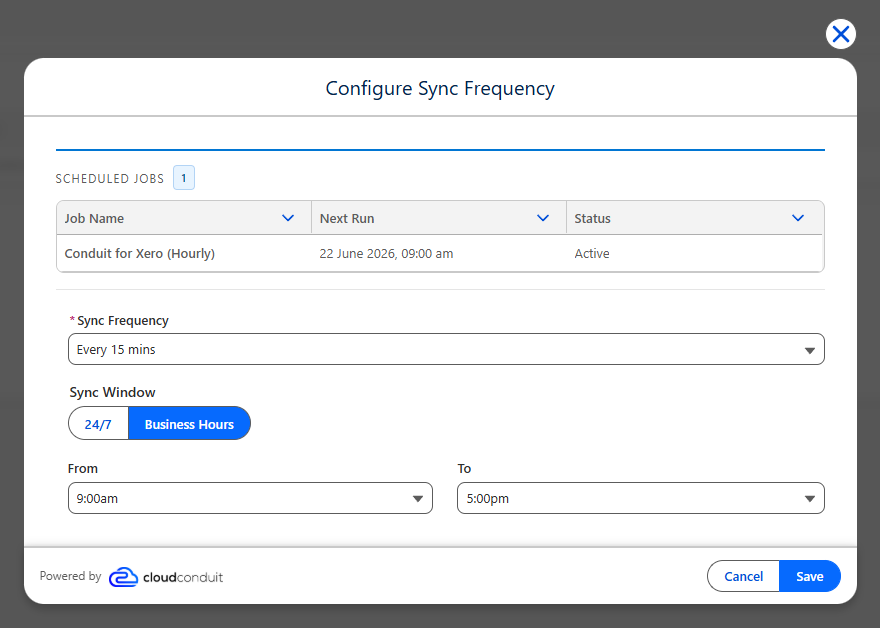
The Scheduled Jobs section at the top lists the sync job that’s currently scheduled, with its Next Run time and Status. It only appears once a schedule exists.
Set the following values:
- Sync Frequency — how often the sync runs. The same frequencies as the header menu are available, apart from Custom.
- Sync Window — 24/7 runs the sync around the clock. Business Hours restricts it to the hours you choose.
- From and To — the start and end of the sync window. These only appear when Business Hours is selected, and default to 9:00am and 5:00pm.
Click Save. The new frequency and window take effect immediately and apply to every connected tenant. When a business hours window is set, the page header shows it after the frequency, for example Hourly (9 AM - 5 PM).